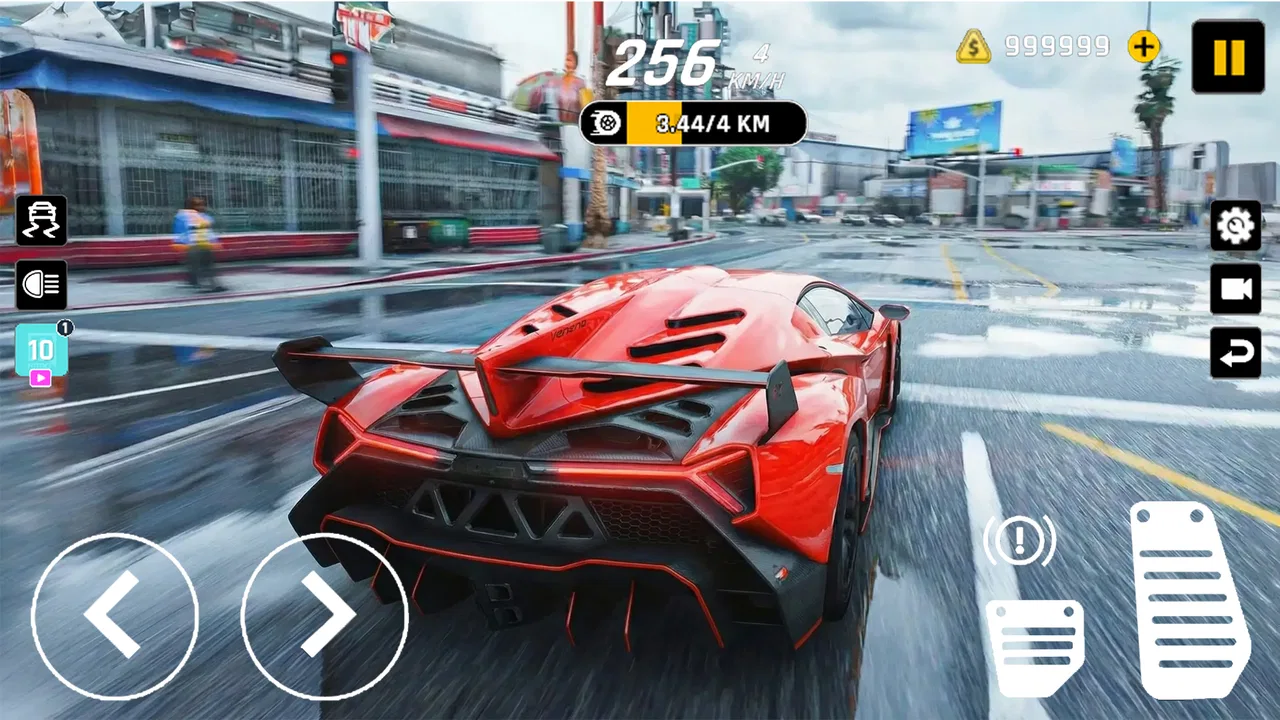
Nitro Car Driving Master
- 4.9
- Rating
- 5.00M
- Installs
- Free
- Price

 Analysis by App-foxy
I first picked up Nitro Car Driving Master expecting a quick racing game for spare moments, but its real appeal became clearer when I used it on a shared household device. It is easy to understand, free to start, and focused on the simple tension of staying fast while reacting to traffic and sharp bends. That makes it a natural choice when different people want to take short turns without learning a complicated control system.
At the same time, this is not a full racing simulator or a deep car-collection game. NitroTech Studio has built a compact arcade racer around timing, concentration, and repeated attempts. I found the experience most enjoyable when I treated each run as a personal challenge rather than expecting a long career mode or a detailed motorsport package. That distinction matters before you install it, especially if you usually prefer realistic handling, extensive customization, or structured multiplayer competition.
How the game works on a shared device
The central idea is straightforward: drive quickly, read the road, avoid traffic, and keep control through tight turns. The store summary describes that balance well, but playing with other people in the same home highlights another strength. A person can hand over the device after a run, explain the basic goal in a few words, and let the next player try without a long tutorial session.
You May Also Like

 Blood Strike: 2.5 Anniversary
Blood Strike’s Loadouts Turn Every Drop Into a Tactical Gamble
A close look at Blood Strike’s custom loadouts: how fast access to signature weapons reshapes its battle royale rhythm, rewards preparation, and narrows the gap between fights.

 Pandora - Music & Podcasts
Pandora’s Music Is Easy to Start, but Harder to Recover
Pandora’s strength is its low-effort path from a seed to a station. Its weak spot is how much confidence it asks you to place in connection, setup, and quiet recovery.

 8 Ball Pool
 Is Built on Rivalries, Rematches, and Routine
A close look at the rivalries, rematches, shared routines, and unanswered safety questions that turn a quick pool match into a persistent mobile community.

 Samsung Music
’s Quiet Strength Is Playing What You Already Own
Its reach comes less from spectacle than from dependable access to a personal library. That simplicity is both the app’s strongest retention engine and its ceiling.

 AccuWeather: Weather Radar
AccuWeather Review: A Quick, Clear Forecast for Everyday Decisions
For everyday plans, the best forecast is the one you can understand quickly. AccuWeather makes rain timing, radar, and local conditions easy to act on, with a few trade-offs.

 Hill Climb Racing
Why Hill Climb Racing Still Turns Crashes Into One More Run
A tiny car, a bumpy hill and one more upgrade: Hill Climb Racing keeps resurfacing because its simple chaos makes every near-miss feel personal.
More From Our News Desk



That makes it suitable for a living-room moment, a short break, or a family member who does not normally play racing games. I would not describe it as a party game in the formal sense, because there is no confirmed reason to assume a dedicated local multiplayer mode. Instead, the shared-device value comes from taking turns and comparing personal performance informally.
In my experience, this kind of arrangement works best when everyone agrees on what counts as a fair attempt. One person might restart repeatedly to chase a better run, while another may prefer one relaxed turn. Since the game is built around avoiding mistakes at speed, even a short session can become surprisingly competitive without anyone needing to understand racing terminology.
A useful household routine is to give each player a fixed number of attempts, then pass the device. That avoids one person holding on indefinitely because they are close to a better result. It also makes the game feel less like a private activity and more like a quick shared challenge. I found this especially practical when the device was being used by people with very different gaming habits.
What makes the driving engaging
The appeal comes from the relationship between speed and caution. Driving slowly may make traffic easier to read, but the game’s identity is tied to pushing the car. Driving aggressively creates more exciting runs, yet it also leaves less room to recover when a turn arrives or another vehicle blocks the preferred line.
I recommend watching the road farther ahead than feels necessary. New players often focus on the car immediately in front of them and react too late to the next problem. A better approach is to identify the upcoming bend, notice traffic patterns early, and make small adjustments before the road becomes crowded. This is a simple habit, but it changes the game from frantic swerving into something more deliberate.
Another practical tip is to avoid treating every opening as an invitation to accelerate. If traffic is already narrowing your path before a turn, preserving a clean line is often more valuable than forcing a risky pass. That trade-off is one of the more interesting parts of the experience: the game rewards confidence, but careless confidence ends a promising run quickly.
The controls also benefit from a calm grip. On a shared device, each player may hold the phone differently, which can make the first few turns feel inconsistent. I found it helpful to begin with a short adjustment run instead of judging the game immediately. This gives each person time to understand how much movement is needed and reduces arguments about whether a missed turn was caused by the player or by unfamiliar handling.
Setting up expectations before handing over the device
The game is free, so the initial decision is easy for a household: anyone can try it without treating the installation as a major purchase. Its content rating is Everyone, which makes it more approachable for mixed-age use. Still, an age label should not replace ordinary supervision. A younger player may enjoy the colorful speed and immediate action, while an older child may become frustrated by repeated crashes or want to play far longer than planned.
I would set boundaries around turns, volume, and when the device can be used. Those rules are not built into the game; they are part of using a racing title responsibly on a shared phone or tablet. A short agreement such as “finish the current attempt, then pass it on” prevents the most common household problem: a quick game quietly becoming an argument over possession of the device.
It is also worth deciding whether the device belongs to one person or is genuinely communal. That distinction affects how comfortable everyone feels about installing a new game, changing settings, or leaving progress visible. I would ask before installing it on someone else’s phone, particularly if that person uses the device for work, school, navigation, or other time-sensitive tasks.
Because this is a racing game rather than a productivity tool, I would keep it separate from important routines. A child waiting for a ride may use it appropriately for a few minutes, but the same game can become distracting during homework or a family conversation. The fast pace encourages “one more attempt,” so a visible stopping point is more useful than relying on good intentions.
Account boundaries and shared progress
One question many households have is whether several people can keep separate progress. I would not assume that simply because multiple people use the same device. Unless the game clearly offers separate profiles or another account-based method, the safest approach is to treat the installation as one shared play space and agree that progress belongs to the device rather than to a particular person.
That may sound minor, but it becomes important when one player is practicing seriously and another is experimenting. A younger player might restart often, while an experienced player may want to preserve a strong run. If everyone knows that the game is being used collectively, disappointment is easier to avoid.
For a household that needs strict individual records, a racing game with clearly documented profiles, cloud synchronization, or formal family accounts may be a better fit. Nitro Car Driving Master works better when the goal is casual turn-taking than when every achievement must remain separated and protected. I see that as a practical limitation, not a flaw in the driving itself.
I also recommend keeping store-account decisions with the device owner. The game is free, but free installation does not mean every household member should automatically be allowed to manage downloads or account settings. Parents and guardians should handle those choices directly, while younger users can simply play within the boundaries already agreed upon.
Coordination makes the short sessions better
The most successful shared sessions I had were coordinated rather than improvised. We decided who would play first, how many attempts each person received, and whether the goal was the best run or simply the cleanest one. That small amount of planning removed pressure and made the game more welcoming to players who were still learning.
It helps to separate skill levels. A confident player may want to chase maximum speed, while a beginner may need several attempts just to understand traffic timing. If both are judged by the same standard immediately, the beginner can feel as though there is no point continuing. Giving each person a different challenge works better: one player can focus on survival, another on sharper turns, and another on maintaining speed.
A good coordination trick is to have the waiting player act as a spotter, not a critic. They can point out an upcoming bend or remind the driver to look beyond the nearest car, but constant back-seat instructions quickly become irritating. The driver still needs room to develop their own timing, especially because reacting to several voices is harder than reacting to the road.
This also reveals a subtle strength of the game. Since the basic objective is easy to explain, conversation can remain part of the session. You do not need to pause and discuss complicated equipment, vehicle statistics, or race regulations. The shared activity is about noticing mistakes, trying again, and deciding whether a safer line would have produced a better result.
On the other hand, people who want direct competition against friends may find the arrangement limited. Taking turns can be fun, but it is not the same as racing side by side. If your main reason for downloading a racing game is live competition, a title designed around online or local multiplayer would likely suit you better.
Age, trust, and the right kind of supervision
The Everyone rating makes the game easier to introduce to a broad audience, and I found the driving concept accessible enough for casual players. Still, suitability depends on the child as much as on the label. Some children enjoy quick retries and learning through mistakes; others become upset when a run ends suddenly or when an older sibling consistently performs better.
For younger players, I would begin by playing alongside them. That gives you a chance to see how they understand the traffic, whether the pace feels comfortable, and whether they can stop when asked. It also turns the game into a shared learning activity instead of leaving the child alone with a fast, repetitive challenge.
Trust matters for older children and teenagers too. The sensible question is not only whether they can play, but whether they can respect the device owner’s boundaries. A shared phone contains personal material and important responsibilities, so access to the game should not automatically mean unrestricted access to everything else on the device. Keeping the play session supervised or using the device in a common area can be a reasonable household choice.
I would also avoid presenting the game as a reward that must always be earned through performance. Racing games are more enjoyable when a player can practice without feeling that every crash is a failure. A child who is struggling with turns may benefit from a calmer explanation of timing, while a child who is already skilled may need a limit on session length rather than more encouragement to continue.
For adults, the age rating is useful context but not a promise that every household will have the same experience. A family with a very young child, a shared work phone, or strict rules about screen time should make the decision based on its own routine. The game is easy to try, but that does not mean it belongs in every device or every schedule.
How it compares with other racing choices
Nitro Car Driving Master sits closer to an arcade driving experience than to a simulation. Compared with a realistic racer, it asks less from the player in terms of technical knowledge and setup. You can focus on the road, traffic, and turns instead of learning detailed vehicle tuning or managing a long list of racing variables.
That simplicity is a strength for shared use. A person who rarely plays games can understand the objective quickly, and an experienced player can still look for cleaner decisions. The trade-off is depth. If you want a broad garage, extensive customization, licensed racing environments, or a carefully structured championship path, you may outgrow this experience.
It also differs from endless runners that reduce driving to constant lane changes. The need to handle tight turns gives the runs a more deliberate rhythm. You are not merely reacting to one obstacle at a time; you are trying to prepare for what comes next while preserving enough control to deal with traffic.
Compared with a multiplayer racing title, its advantage is convenience. You can use it as a quick solo activity or pass the device around without arranging a match. Its disadvantage is that informal competition depends on household cooperation. There is no substitute for real-time opponents if that is the part of racing you enjoy most.
I would choose this game over a heavier racing title for a modest device or a mixed group of casual players, provided everyone is comfortable with short, repeatable runs. I would choose a more advanced alternative for someone who wants long-term progression, detailed car management, or a strong social racing structure. The right choice depends less on the word “racing” and more on whether you want immediate driving or a complete motorsport hobby.
Device fit, versions, and everyday convenience
The game supports Android devices running version 7.0 or newer, which covers a wide range of phones and tablets. That makes it easier to consider for a household with an older spare device rather than only the newest hardware. Even so, I would test it on the actual shared device before promising it to everyone, because comfort depends on screen size, grip, and how easily each player can see the road.
The current release is version 1.0.5, and the developer is NitroTech Studio. I like having those details visible when deciding whether an older household device is a sensible place to install the game. Keeping the app updated through the normal store process is also worthwhile, particularly when several people rely on the same installation.
Its public reception is encouraging: it holds a 4.7 average from around a thousand ratings, with more than a million installs. Those figures suggest that the basic concept has reached a substantial audience, but they should not replace your own test. A high average cannot tell you whether the controls feel comfortable in your hands or whether the pace suits the youngest person who will use the device.
The game is free and rated Everyone, so the barrier to trying it is low. I would still treat installation as a household decision when storage, screen time, and shared-account responsibilities matter. The simplest workflow is to install it with the device owner present, play a few runs, and then decide whether it deserves a permanent place on the home screen.
Where the game falls short
The same focused design that makes the game approachable can make it feel narrow for committed racing fans. Repeated driving, traffic avoidance, and turn management are satisfying when you are improving, but the experience may lose its pull if you want many different activities within one app. I would not install it expecting a complete substitute for a large racing collection.
Shared-device play can introduce its own friction. Without clearly separated household routines, one person may dominate the device, while another may feel that their progress is being interrupted. The game cannot solve that social problem for you. The best results come from agreeing on turns before the first run, not from trying to settle the issue after someone has already played longer than expected.
It is also not the ideal choice for someone who dislikes failure-heavy arcade design. Traffic and tight bends create moments where a small mistake ruins an otherwise good attempt. I enjoy that pressure, but players who prefer relaxed cruising may find the repeated retries tiring. A slower driving game would be kinder for that audience.
Finally, the game’s simplicity means that advanced players must create their own goals. You can work on safer lines, better anticipation, and more consistent speed, but those challenges come from your approach rather than from a complex training system. That is fine for self-motivated players and less appealing for anyone who needs a long progression structure to stay interested.
My household verdict
I recommend Nitro Car Driving Master for households looking for a free, accessible racing game that several people can enjoy in short turns. Its strongest quality is not just speed; it is the way the basic driving challenge can be explained quickly and shared without a long setup. A parent, sibling, or friend can try it, learn the road rhythm, and contribute to a casual competition within minutes.
I would install it on a shared device when the household is comfortable treating progress as communal, setting clear turn limits, and supervising younger players according to their own routines. I would skip it when separate accounts, formal multiplayer, detailed simulation, or deep car customization are essential. Those needs point toward a different kind of racing game.
My practical advice is to begin with a short group session. Let each player take a few attempts, compare how they handle traffic, and decide whether the pressure of tight turns feels exciting or frustrating. If the game fits your device and your household’s boundaries, it earns its place as an easy pick-up-and-play racer. For shared use, the best feature is the low learning barrier, while the main trade-off is that the household—not the game—must provide the structure.
FAQs for Nitro Car Driving Master
01What devices are compatible with Nitro Car Driving Master?
Nitro Car Driving Master is compatible with most Android and iOS devices. For Android, your device should be running version 5.0 or higher. For iOS, it requires iOS 11.0 or later. Ensure your device has adequate storage and RAM for optimal performance. Check the app store for specific compatibility details.
02Does Nitro Car Driving Master require an internet connection?
While Nitro Car Driving Master offers offline modes for solo play, certain features like multiplayer races and leaderboards require an internet connection. For the best experience, it’s recommended to have a stable Wi-Fi or mobile data connection when accessing these online components.
03Are there in-app purchases in Nitro Car Driving Master?
Yes, Nitro Car Driving Master includes in-app purchases. Players can buy various items, such as new cars, upgrades, and aesthetic customizations. While the game is free to download and play, these purchases can enhance your gaming experience and help you progress faster.
04How can I improve my skills in Nitro Car Driving Master?
Improving your skills in Nitro Car Driving Master involves practicing regularly and understanding different car dynamics. Experiment with various cars to find one that suits your driving style. Additionally, learning the tracks and mastering control techniques, such as drifting and nitro boosts, can significantly enhance your performance.
05What should I do if I encounter technical issues with the game?
If you encounter technical issues with Nitro Car Driving Master, first ensure your device meets the game's requirements and that your software is up to date. Restarting your device can resolve minor issues. If problems persist, check the app's support page for troubleshooting tips or contact customer support for further assistance.
Pros
- Realistic graphics enhance gameplay immersion.
- Wide variety of cars to choose from.
- Intuitive controls make driving feel natural.
- Challenging levels keep players engaged.
- Frequent updates with new features.
Cons
- In-app purchases can be pricey.
- Ads can be intrusive and frequent.
- Requires a stable internet connection.
- Some levels can feel repetitive.
- High battery consumption during play.

Nitro Car Driving Master
Gallery